Demographic data tells you who someone is — their plan, their country, their company size. Behavioral segmentation tells you what they just did and what they will likely do next. That second signal is the one that should drive your messaging, because intent and timing are what make a message feel relevant instead of random.
What behavioral segmentation is
Behavioral segmentation is the practice of grouping users by their actions rather than by static attributes alone. Instead of asking "which users are on the Pro plan in Nigeria," you ask "which users completed onboarding but haven't returned in 14 days" or "which users fired the checkout_started event three times this week." The grouping is defined by events people fired, how recently, and how often.
Contrast that with the segmentation most teams start with:
- Demographic segmentation — age, location, language, job title.
- Firmographic segmentation — company size, industry, revenue band.
- Attribute-based segmentation — plan tier, signup source, account status.
Those attributes are useful context, but they are mostly static. Behavioral segmentation layers in the live signal — the events streaming off your product — so your audiences reflect what users are actually doing right now.
Why behavior beats attributes for messaging
The reason behavior wins is simple: it carries intent and timing. Two users can share every attribute — same plan, same country, same signup month — and need completely opposite messages. One is a power user who logs in daily and just invited three teammates; the other logged in once and vanished. A "here's an advanced tip" email delights the first and confuses the second.
When you segment on behavior, the message follows the moment. Someone who just abandoned checkout gets a nudge about that cart. Someone who hit a usage milestone gets an upgrade prompt while the value is fresh. The same words land very differently depending on where the user is in their journey, and only behavioral data knows where that is.
Common types of behavioral segments
Most useful behavioral segments fall into four families:
Activity and recency
Grouping by how recently and how often someone acts — "active this week," "inactive for 30 days," "logged in 5+ times this month." Recency is the backbone of re-engagement.
Lifecycle stage
Where the user sits in their journey — onboarding, activated, engaged, churn-risk, churned. A user becomes "activated" when they hit a core action (created their first project, booked their first session), and "churn-risk" when engagement drops off.
Engagement
Interaction with your product and your messages — email opens and clicks, feature usage, session depth. For example, "opened the last 3 emails but never clicked" or "used the reporting feature at least once."
Purchase and conversion behavior
Actions tied to revenue — added a payment method, upgraded, downgraded, abandoned checkout, made a repeat purchase. "Started checkout but didn't complete in 24 hours" is a classic conversion segment.
Static lists vs dynamic segments
Here is the core problem with the old way of working. A hand-built list — the CSV you exported, the audience you tagged by hand — is stale the moment you create it. Users who match the criteria tomorrow never get added, and users who no longer qualify never get removed. You are messaging a snapshot of the past.
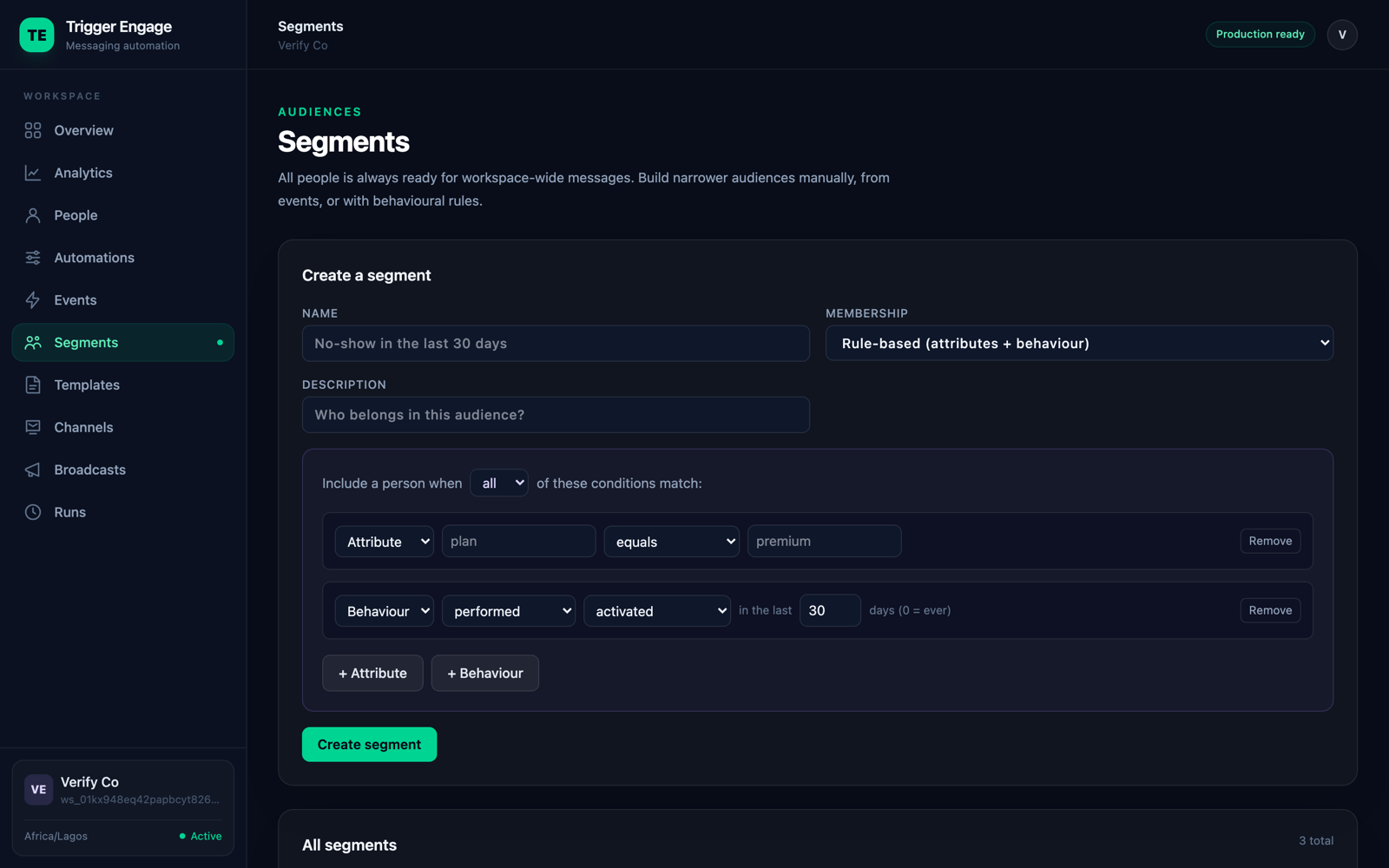
Dynamic segments fix this. A dynamic segment is defined by a rule, not a fixed list of IDs, and the system re-evaluates membership automatically as data changes. You describe the audience once — "no login in 14 days" — and the segment keeps itself accurate.
| Segment | Rule | Use case |
|---|---|---|
| No-shows | Booked an appointment but did not attend in the last 30 days | Win-back / rebooking nudge |
| Power users | 5+ key actions in the last 7 days | Ask for a referral or review |
| Dormant | No login in the last 14 days | Re-engagement sequence |
| Trial ending | On trial, created 3 days ago, no upgrade event | Conversion push before expiry |
| Cart abandoners | Fired checkout_started but not purchase in 24h | Recover the abandoned checkout |
How self-updating segments work
A self-updating segment is a rule that combines three things: attributes (who they are), behavior (what events they fired), and a time window (how recently). For example: "plan = free" AND "fired report_generated at least once" AND "no login in the last 14 days."
The system recomputes membership continuously as reality changes on three axes:
- New events arrive — a user fires
report_generatedand now matches the behavior clause. - Profiles change — a user upgrades from free to Pro and drops out of a free-only segment.
- Time passes — a user who logged in 13 days ago silently crosses the 14-day threshold tomorrow with no event at all.
That last point is the one people miss: time-based segments fill and empty on their own even when nothing happens. "Inactive 14 days" grows every night as more users go quiet, and shrinks every time one comes back. This is exactly what a good tool does for you automatically. Customer.io alternatives vary widely in how well they support this, so it's worth checking before you commit. TriggerEngage handles it with rule-based segments that re-evaluate as events stream in — see the segments docs for the rule syntax.
Putting segments to work
A segment is only useful once it drives a message. There are two main ways to use them:
- Trigger automated flows. Wire a segment to lifecycle email sequences so that entering the segment kicks off a series — a dormant user enters a re-engagement flow, a new user enters onboarding.
- Send one-off broadcasts. Take a snapshot of a dynamic segment and send a single announcement or campaign to everyone in it right now.
Whichever you choose, keep the message tied to the behavior that defined the segment. If the segment is "abandoned checkout," the email should talk about the cart — not this month's newsletter. The tighter the link between the behavior and the message, the better it performs.
Getting started
You don't need dozens of segments to see results. Start small and deliberate:
- Build 3–5 high-value segments first — typically new, activated, and at-risk users.
- Tie each segment to one action. One segment, one message, one goal. Resist the urge to overload a segment with five different sends.
- Measure movement, not size. The win isn't a bigger list — it's users flowing from "at-risk" back to "active," or from "trial" to "activated." Track transitions between segments as your real metric.
Get those fundamentals right and behavioral segmentation stops being a reporting exercise and becomes the engine that decides who hears from you, and when.