"Hi {{ first_name }}" is where personalization starts, not where it ends. Personalizing emails with Liquid means turning a single template into thousands of tailored messages, each one assembled at send time from the data you already hold about a person. Once you stop thinking of a template as fixed copy and start thinking of it as a small program, the name at the top becomes the least interesting thing you can do.
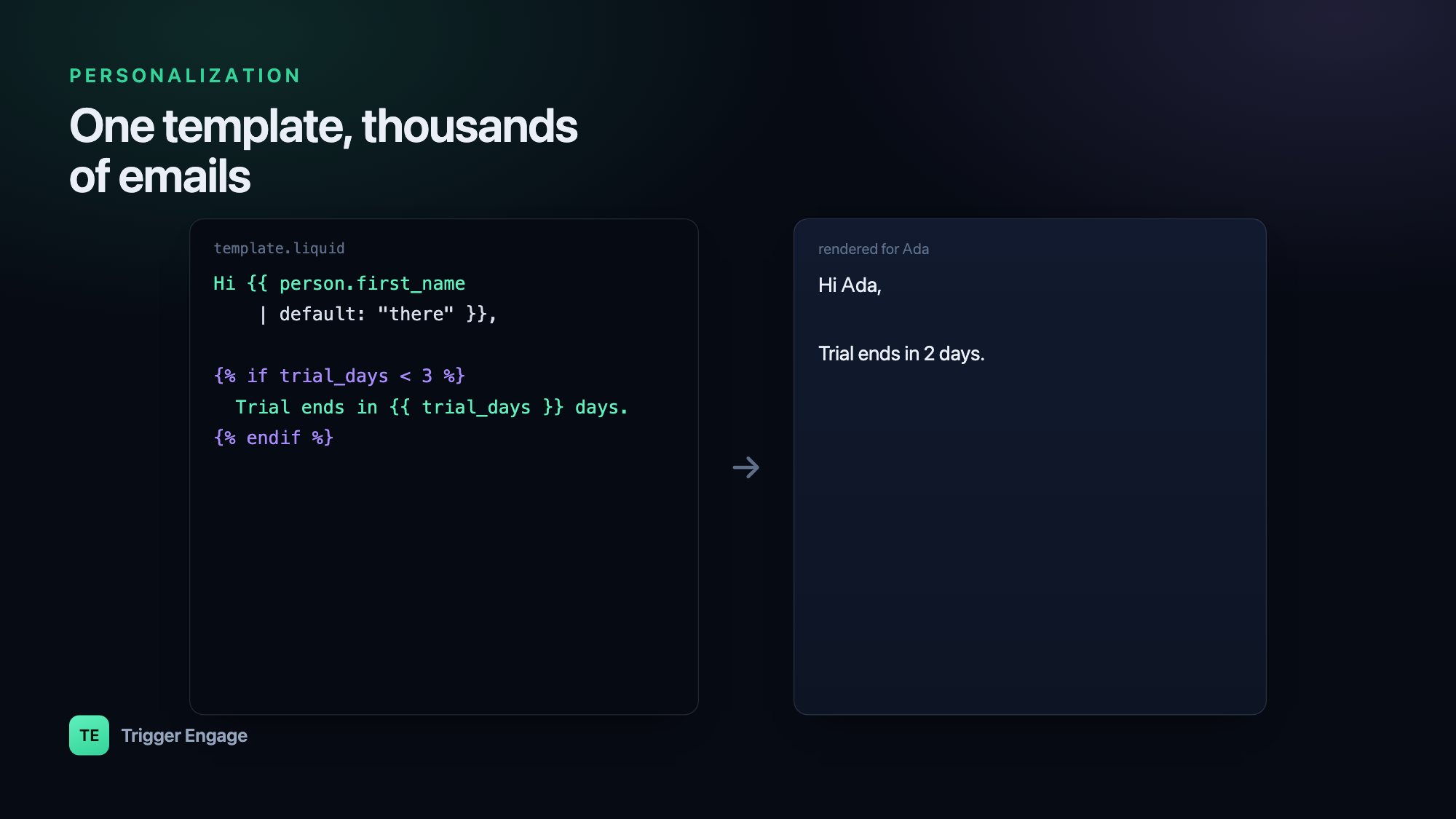
What is Liquid?
Liquid is a safe templating language created by Shopify and now used across a wide range of email and messaging tools. "Safe" is the operative word: a template author can output data and run simple logic, but cannot reach into your server, run arbitrary code, or crash the process. That makes it ideal for rendering messages from untrusted or user-supplied data.
Liquid has two building blocks. Output uses double curly braces to print a value, and tags use curly-brace-percent to run logic:
{# output prints a value #}
Hello, {{ person.first_name }}!

{# tags run logic, and print nothing themselves #}
{% if person.plan == "pro" %}Thanks for going Pro.{% endif %}
That is the whole model: output what you know, and use tags to decide what to output.
Variables and safe fallbacks
Variables come from your data — most commonly a person's profile. The risk is that a field is empty, and an email that greets someone with "Hi ," instantly reads as automated. The default filter guards against this:
Hi {{ person.first_name | default: "there" }},

{# empty city falls back gracefully #}
Weather near {{ person.city | default: "you" }} looks good.
Make a fallback a habit for every user-supplied field. A blank name should never reach the reader.
Conditionals
Conditionals let one template serve audiences that need different copy. Use if, elsif, and else to branch on plan, country, or past behavior:
{% if person.plan == "free" %}
  You're on the Free plan — upgrade to unlock reports.
{% elsif person.plan == "pro" %}
  You're on Pro. Here's what's new this month.
{% else %}
  Welcome! Pick a plan that fits.
{% endif %}
You can branch on anything in the data — contains for tags, comparisons for numbers, or a flag set by an event:
{% if person.country == "NG" and person.orders > 3 %}
  As a returning customer in Nigeria, here's free delivery.
{% endif %}
Loops
Loops render a block once per item in a list — perfect for order line items, recommended products, or a digest of recent activity. The for tag walks a collection:
<ul>
{% for item in order.items %}
  <li>{{ item.name }} — {{ item.qty }} × {{ item.price }}</li>
{% endfor %}
</ul>
Liquid also gives you loop helpers. forloop.first, forloop.last, and limit let you shape the output without extra data:
{% for product in recommendations limit: 3 %}
  {{ product.name }}{% unless forloop.last %}, {% endunless %}
{% endfor %}
Filters
Filters transform a value on its way to output. They chain left to right with the pipe character, and they are how you format text, dates, and numbers so the email looks hand-written rather than machine-dumped:
{{ person.first_name | capitalize }}          {# ada -> Ada #}
{{ coupon_code | upcase }}                {# save10 -> SAVE10 #}
{{ order.created_at | date: "%B %-d, %Y" }}  {# July 4, 2026 #}
{{ order.total | divided_by: 100.0 }}      {# kobo -> naira #}
Because monetary values are often stored in the smallest currency unit, a formatting filter is frequently where you convert for display. Keep the raw value in your data and format only at the template edge.
Personalization beyond the first name
The real wins come from behavior and context, not the greeting. Reference what the person actually did — the report they generated, the item left in the cart, the feature they have not tried — and the message stops feeling like a broadcast. Tie copy to the person's lifecycle stage or segment and each email arrives with a reason to exist:
{% if person.lifecycle == "trial" and person.reports_created == 0 %}
  You haven't built your first report yet — here's a 2-minute start.
{% endif %}
This is exactly what makes drip campaigns and onboarding emails feel one-to-one: the same template renders differently for a stalled trial user than for a power user, so nobody gets a message that ignores where they are.
Feeding Liquid with data
A template can only render what it receives. Variables come from two places: the person profile (attributes, tags, segments) and the event that triggered the message. That second source is powerful — the same event you fire from your app can carry the exact data your template needs. Fire a order.placed event with the items and total attached, and your receipt email renders those line items directly:
{# data from the triggering event #}
Order {{ event.order_id }} confirmed — {{ event.total | divided_by: 100.0 }}.
{% for item in event.items %}
  • {{ item.name }}
{% endfor %}
TriggerEngage takes this approach: it uses Liquid for its email, SMS, and push templates, drawing personalization from person attributes, event data, and segments — and because it is open source and self-hostable, the data model behind those variables is fully in your control.
Test it before you send
Liquid fails quietly — a wrong field name usually renders as nothing, not an error. So preview every template with realistic sample data before it goes out. Decide deliberately how missing variables should render: an empty string, or a sensible default. Then, when the copy matters, A/B test the personalized version against a generic one — personalization is a hypothesis, and the numbers will tell you which fields actually move opens, clicks, and conversions.
Frequently asked questions
What is Liquid templating?
How do I add a fallback for a missing name in Liquid?
{{ person.first_name | default: "there" }}. If the field is undefined or empty, Liquid outputs "there" instead of a blank, so a reader never sees "Hi ,". Add a fallback to every user-supplied field you print.How do I loop over items in an email?
{% for item in order.items %}{{ item.name }}{% endfor %}. Each item in the list renders the block once. Helpers like limit, forloop.first, and forloop.last let you cap the count or handle separators without extra data.